Linear vs SuperPM: Which Tool Do Engineering Managers Actually Need?
Linear is one of the best issue trackers ever built. Fast, clean, opinionated. If you have used it, you know the feeling: everything just works.
But if you are an engineering manager, you have probably noticed something. You open Linear every morning, scan through your team's cycles, check a few tickets, glance at the progress bar, and you still walk into standup unsure whether the sprint is actually on track.
That is not a Linear problem. That is a category problem. Linear was built to help engineers organize and execute work. It was not built to help managers predict delivery risk, balance team workload, or generate stakeholder reports.
SuperPM was built specifically for that gap.
This article breaks down how the two tools compare, where they overlap, and when you need one, the other, or both.
What Linear Does Well
Linear is a project management and issue tracking tool designed for software teams. It handles the day-to-day mechanics of engineering work: creating tickets, managing cycles (sprints), tracking projects, and organizing roadmaps.
Its core strengths:
- Speed. The interface is remarkably fast. Keyboard-first navigation, instant search, near-zero latency on every interaction.
- Opinionated workflows. Linear does not try to be everything. It enforces a specific way of working, cycles, projects, triage, and that consistency pays off as teams scale.
- Developer adoption. Engineers actually like using it, which is rare for project management tools. That alone solves a massive data quality problem: if engineers update their tickets, managers get better signal.
- Clean API and integrations. GitHub and GitLab sync, Slack notifications, and a well-documented API make Linear easy to embed into existing workflows.
For individual contributors, Linear is close to perfect. The problem starts when you are the person responsible for what happens across the team, not just inside a single ticket.
Where Linear Falls Short for Engineering Managers
Linear gives you the raw data. Every ticket, every status change, every cycle. But it expects you to synthesize that data yourself. And that synthesis, the work of understanding whether your team will actually deliver what was promised, is exactly where most engineering managers spend their time.
Here is what that looks like in practice.
Sprint risk detection is manual. Linear shows you a progress bar on your cycle. It tells you how many points are done versus how many remain. It does not tell you that three of your remaining tickets have not moved in four days, that one of them is blocked by a PR stuck in review, or that the engineer assigned to the most critical item has six hours of meetings tomorrow. You piece that together yourself, across Linear, GitHub, Google Calendar, and Slack.
Workload distribution is invisible. You can see who is assigned to what, but you cannot see who is overloaded. Linear does not know that one engineer has 30 story points and 20 hours of meetings this week while another has 10 points and a clear calendar. You find out when someone misses a deadline or tells you they are burned out.
Reporting is manual. Every Friday, someone, usually you, spends 30 to 60 minutes pulling together a delivery update for stakeholders. What shipped, what slipped, what is at risk. Linear gives you the ingredients, but you write the report yourself.
Historical patterns are hard to extract. How accurate are your team's estimates? What is your average cycle time? How much scope creep happens per sprint? Linear stores the data, but surfacing these trends requires exporting to spreadsheets or building custom queries through the API.
None of this is a criticism of Linear. It was not designed to solve these problems. It was designed to be the best issue tracker for software teams, and it succeeds at that.
What SuperPM Does Differently
SuperPM is not an issue tracker. You do not create tickets in SuperPM, and your engineers never need to log into it.
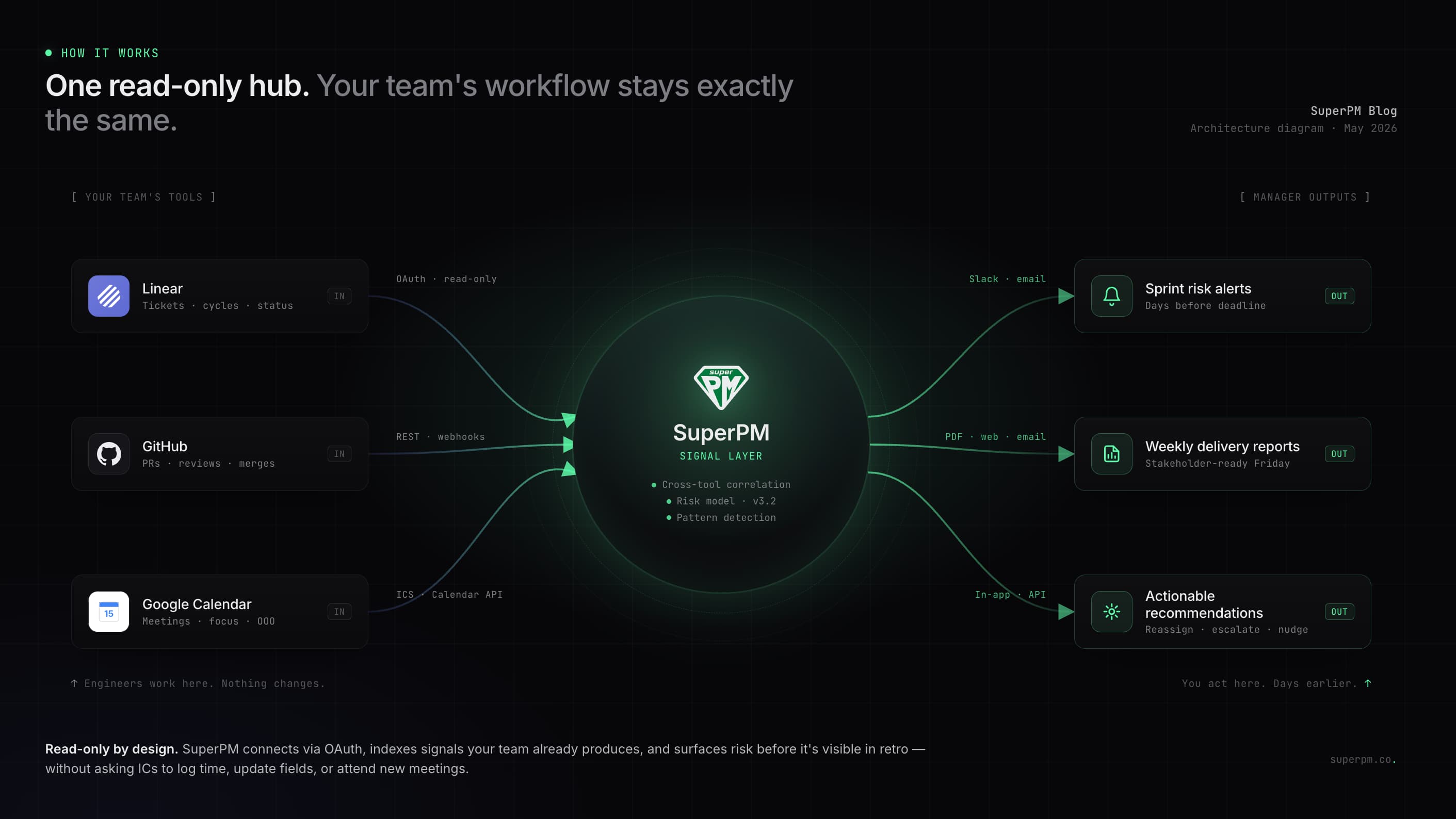
SuperPM connects to the tools your team already uses Linear, Jira, GitHub, GitLab, Google Calendar, Slack, and cross-references the signals from all of them to give you, the engineering manager, a clear picture of what is actually happening with delivery.
The difference is the unit of analysis. Linear thinks in tickets. SuperPM thinks in risk.
Predictive sprint alerts. SuperPM monitors your active sprint continuously. When a combination of signals suggests the sprint is trending off-track, stale tickets, velocity drop, scope additions, blocked PRs, it sends you an alert. Not a dashboard you have to check. A notification in Slack or email that says: this sprint is at risk, here is why, and here is what you can do about it.
Calendar-aware workload analysis. This is something no issue tracker can do on its own. SuperPM cross-references ticket assignments with calendar data to calculate actual available engineering time. An engineer with 25 hours of meetings and 40 story points is going to miss something. SuperPM flags that before it becomes a missed deadline.
Automated weekly reports. Every Friday, SuperPM generates a stakeholder-ready delivery summary. What shipped, what is in progress, what slipped and why, what is at risk for next week. You review it, adjust if needed, and send it. The Sunday night report-writing session is over.
Actionable recommendations. Most engineering analytics tools show you charts. SuperPM tells you what to do. Not just "sprint X is at risk" but "consider moving ticket Y to next sprint and redistributing Z's workload to free up capacity on the critical path." You still make the decision, but the analysis is done for you.
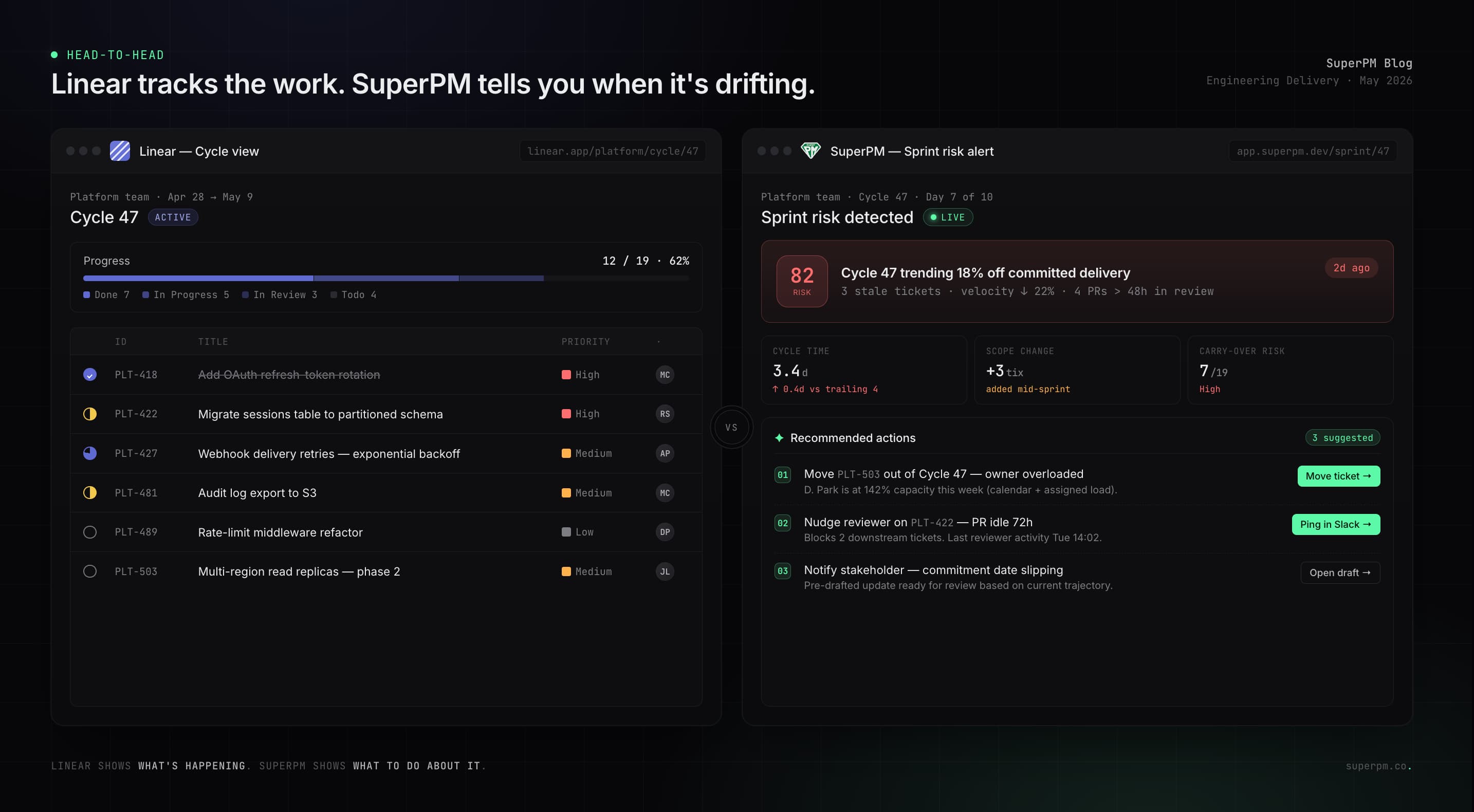
Head-to-Head Comparison
| Capability | Linear | SuperPM |
|---|---|---|
| Issue tracking and ticket management | Yes, core feature | No, connects to your existing tracker |
| Sprint and cycle management | Yes | Monitors, does not manage |
| Sprint risk prediction | No, manual progress bars only | Yes, automated multi-signal alerts |
| Cross-tool signal analysis | No, Linear data only | Yes, tickets plus PRs plus calendar plus Slack |
| Workload and capacity analysis | Basic assignment view | Calendar-aware capacity heatmap |
| Automated delivery reports | No | Yes, weekly stakeholder-ready summaries |
| Estimation accuracy tracking | No | Yes, historical trend analysis |
| Actionable recommendations | No | Yes, specific suggested actions |
| Setup time | 30 minutes to 1 hour | 5 minutes, connect existing tools |
| Requires engineer adoption | Yes, engineers use it daily | No, zero behavior change from team |
| Pricing | From $8 per user per month | From $49 per month for teams up to 25 |
When You Need Linear
You need Linear (or a similar issue tracker) if your team does not have one yet, or if your current tool is slowing your team down. An issue tracker is foundational infrastructure for any engineering team. You cannot manage software delivery without one.
Linear is especially strong if your team values speed, clean design, and opinionated workflows. It is the best tool in its category for teams that want structure without the bloat of legacy tools like Jira.
You should use Linear if you are solving the problem of "where do we track our work."
When You Need SuperPM
You need SuperPM if you already have an issue tracker and your problem is not tracking work, but understanding whether work will be delivered on time.
The typical SuperPM user is an engineering manager who has felt the pain of late discovery: finding out on Thursday that the sprint is off-track, scrambling to re-scope, and explaining the slip to stakeholders after the fact. Or spending their weekends writing delivery reports that no one reads carefully anyway.
SuperPM is for the question that comes after you have organized the work: "Are we actually going to ship this on time, and if not, what should I change right now?"
Using Linear and SuperPM Together
The most common setup is running both. Linear is where your team does the work. SuperPM is where you, the manager, understand the work.
The workflow looks like this. Your engineers use Linear exactly as they do today. They create tickets, update statuses, close issues. Nothing changes for them. SuperPM connects to your Linear workspace through the API, along with your GitHub organization and your team's Google Calendar. From that point forward, you get sprint risk alerts, capacity analysis, and weekly reports without asking your team to do anything differently.
This matters because the biggest failure mode of engineering analytics tools is adoption. If the tool requires engineers to change their behavior, log time, tag tickets differently, fill out extra fields, the data degrades within weeks. SuperPM avoids this entirely by working with the data your team already produces.
Frequently Asked Questions
Is SuperPM a replacement for Linear?
No. SuperPM does not handle issue tracking, cycle management, or any of the day-to-day mechanics of managing engineering work. It is an analytics and intelligence layer that sits on top of your existing tools. You still need an issue tracker. SuperPM makes the data from that tracker more useful for managers.
Does SuperPM work with Jira?
Yes. SuperPM integrates with both Linear and Jira, as well as GitHub, GitLab, Google Calendar, and Slack. If you are currently on Jira and considering a move to Linear, SuperPM works with either one.
How is SuperPM different from LinearB or Swarmia?
Most engineering analytics tools focus on retrospective metrics: DORA scores, cycle time charts, velocity graphs. SuperPM is predictive and prescriptive. It does not just show you what happened last sprint. It tells you what is about to go wrong this sprint and what to do about it. It also uniquely cross-references calendar data with ticket assignments, which no other tool in the category does today.
What does SuperPM cost?
SuperPM starts at $49 per month for teams up to 25 engineers, with a 14-day free trial. There is also a free tier for teams of 5 or fewer. Enterprise pricing is available for larger organizations. Full pricing details are available at superpm.io/pricing.
The Bottom Line
Linear and SuperPM solve different problems at different layers of the engineering management stack. Linear is where work gets organized and executed. SuperPM is where delivery risk gets identified and addressed before it becomes a missed deadline.
If you are an engineering manager who has ever opened your issue tracker on a Thursday morning and realized the sprint is not going to land, SuperPM was built for that moment, and more importantly, for preventing it from happening again.